はじめに
HoloLensアドベントカレンダー2020 の19日目の記事です。
開発環境
- Azure
- Custom Vision
- Speech SDK 1.14.0
- Unity 2019.4.1f1
- MRTK 2.5.1
- Windows 10 PC
- HoloLens2
導入
1. 前回 の記事まで終わらせてください。
2.まずは、Custom Visionで小銭を学習します。手元にあった1円、10円、100円のみを学習します。
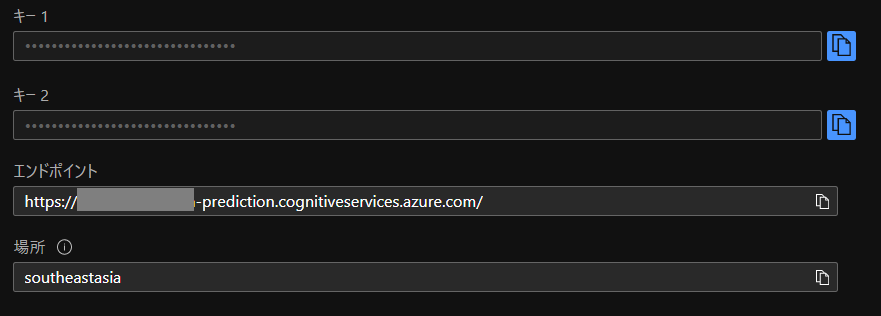
3. Azureポータル から「Custom Vision」を作成。キーをメモっておきます。
 |
 |
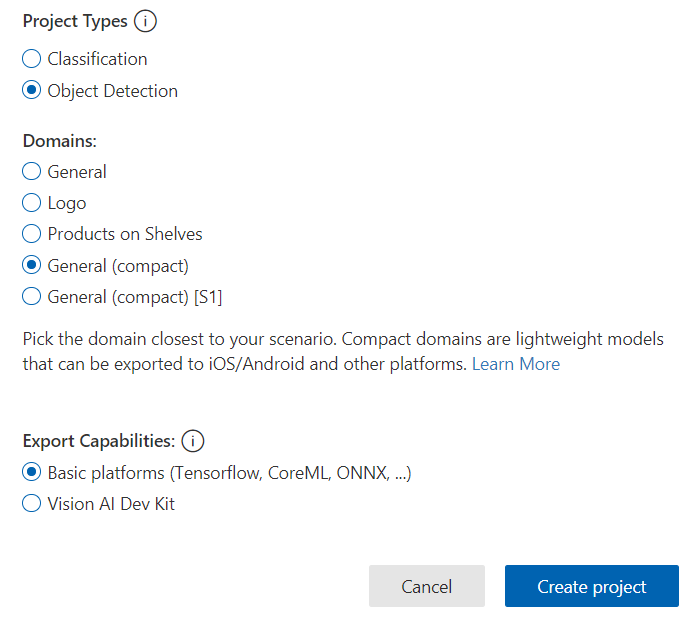
4. Custom Vision にサインインし、新しくプロジェクトを作成します。プロジェクトタイプはObject Detection、学習したモデルをエクスポートしてエッジ推論もできるようにGeneral(compact)、Export CapabilitiesをBasic platformsに設定します。
 |
 |
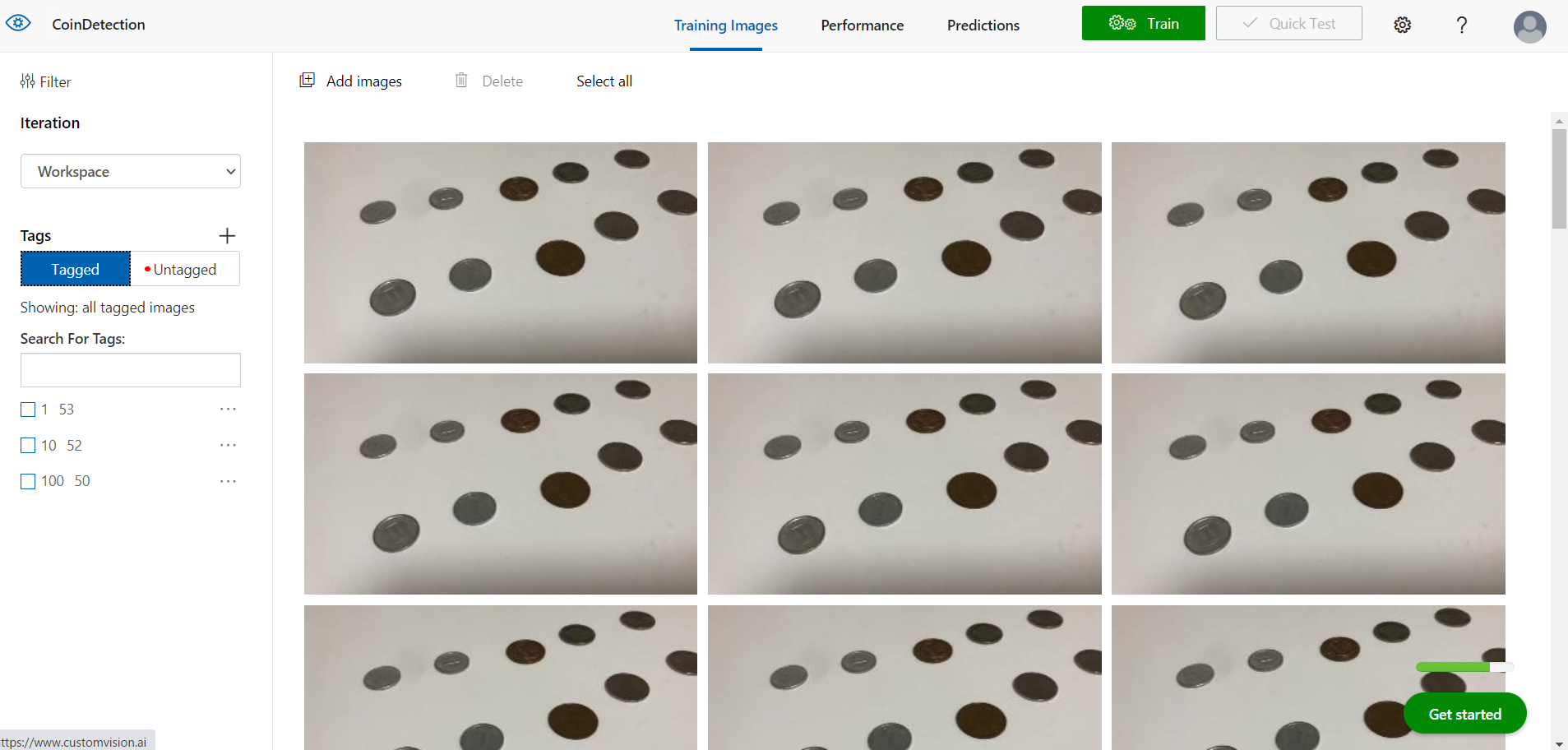
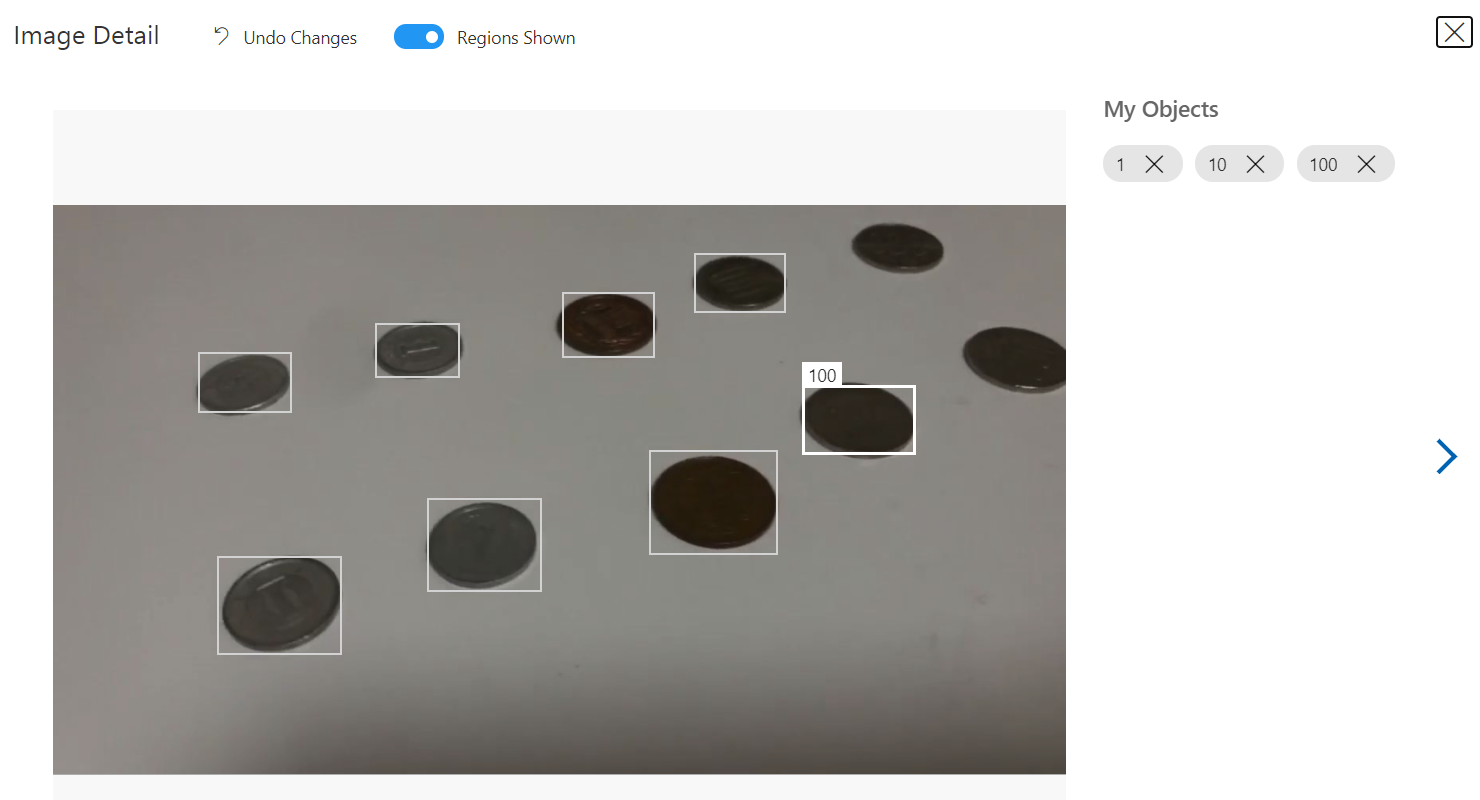
5.小銭を撮影し、学習データをアップロード、タグを付けます。
 |
 |
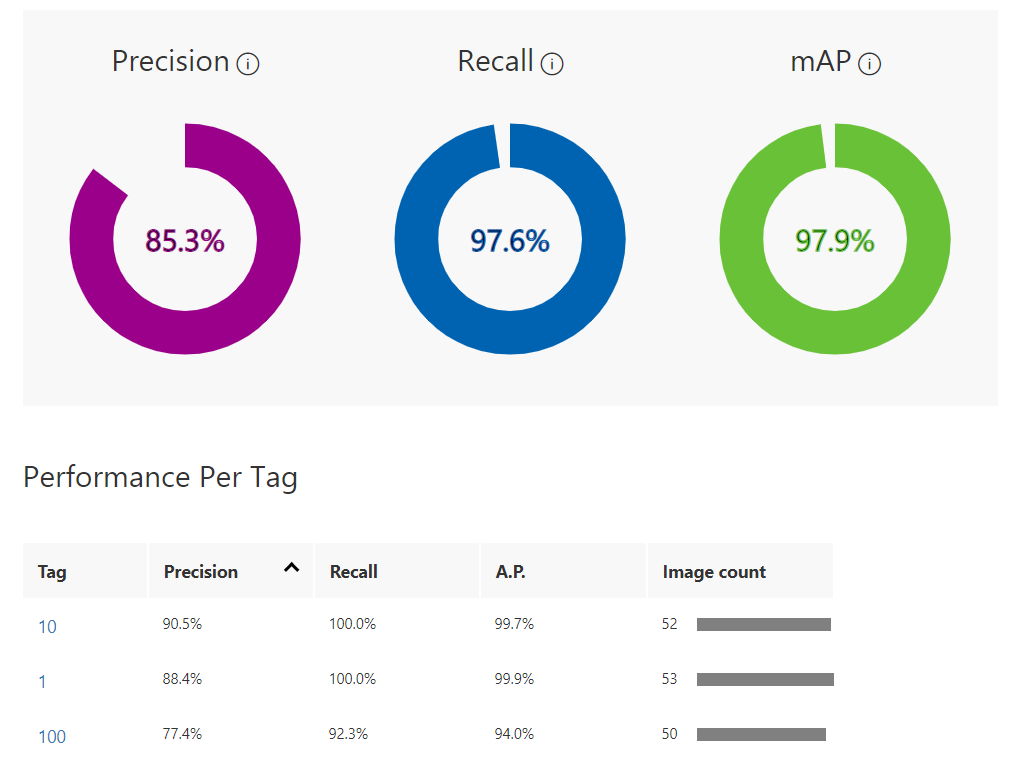
6.Advanced Trainingで1時間学習させました。

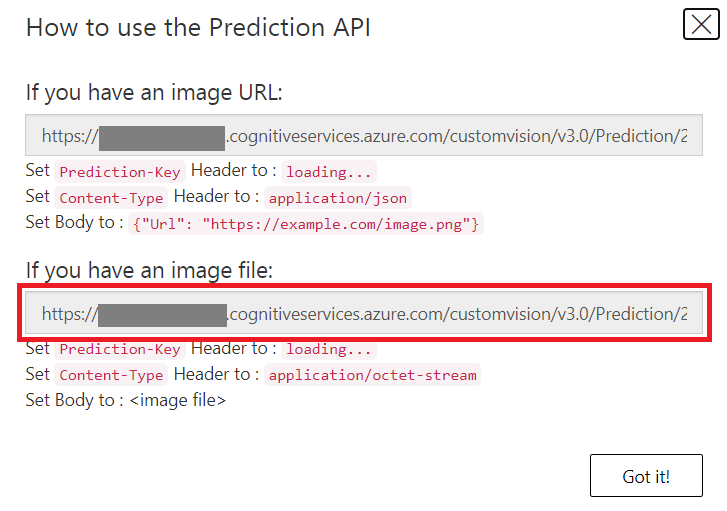
7.学習した結果がこちらです。作ったモデルはPublishし、画像ファイルから推論するエンドポイントをメモっておきます。
 |
 |

9.MySpeechRecognizer.csのUpdate関数を次のように編集し、「いくら」を音声認識するとTapToCaptureObjectDetection.csのAirTap関数を実行します。
1MySpeechRecognizer.cs
2    async void Update()
3    {
4        if (recognizedString != "")
5        {
6            // Debug.Log(recognizedString);
7            if (action){
8                foreach(string ActionWord in ActionWords){
9                    if (recognizedString.ToLower().Contains(ActionWord.ToLower()))
10                    {
11                        Debug.Log("Action");
12                        if(ActionWord == "何が見える"){
13                            Debug.Log("Analyze Image");
14                            this.GetComponent().AirTap();
15                        }else if(ActionWord == "文字を読んで"){
16                            Debug.Log("Read");
17                            this.GetComponent().AirTap();
18                        }else if(ActionWord == "いくら"){
19                            Debug.Log("Custom Vision");
20                            this.GetComponent().AirTap();
21                        }
22                        action = false;
23                    }
24                }
25            }else if (recognizedString.ToLower().Contains(WakeWord.ToLower()))
26            {
27                Debug.Log("Wake");
28                await this.GetComponent().SynthesizeAudioAsync("はい");
29                action = true;
30            }
31        }
32    }
10.「TapToCaptureObjectDetection.cs」スクリプトはこちらになります。
1TapToCaptureObjectDetection.cs
2using System.Collections;
3using System.Collections.Generic;
4using System.Linq;
5using System;
6using UnityEngine;
7using Microsoft.MixedReality.Toolkit.Utilities;
8using System.Threading.Tasks;
9using OpenCVForUnity.CoreModule;
10using OpenCVForUnity.UnityUtils;
11using OpenCVForUnity.ImgprocModule;
12
13// SpeechSDK ここから
14using System.IO;
15using System.Text;
16using Microsoft.CognitiveServices.Speech;
17using Microsoft.CognitiveServices.Speech.Audio;
18// SpeechSDK ここまで
19
20public class TapToCaptureObjectDetection : MonoBehaviour
21{
22    // CustomVision ここから
23    private string cv_endpoint = "";
24    private string cv_subscription_key = "";
25
26    [System.Serializable]
27    public class CustomVisionResult
28    {
29        public string id;
30        public string project;
31        public string iteration;
32        public string created;
33        public Predictions[] predictions;
34
35        // https://baba-s.hatenablog.com/entry/2016/01/20/100000
36        public override string ToString()
37        {
38            return JsonUtility.ToJson( this, true );
39        }
40    }
41
42    [System.Serializable]
43    public class Predictions
44    {
45        public float probability;
46        public string tagId;
47        public string tagName;
48        public BoundingBox boundingBox;
49    }
50
51    [System.Serializable]
52    public class BoundingBox
53    {
54        public float left;
55        public float top;
56        public float width;
57        public float height;
58    }
59
60    // https://mathwords.net/iou
61    public float CalculateIOU(BoundingBox box0, BoundingBox box1)
62    {
63        var x1 = Math.Max(box0.left, box1.left);
64        var y1 = Math.Max(box0.top, box1.top);
65        var x2 = Math.Min(box0.left + box0.width, box1.left + box1.width);
66        var y2 = Math.Min(box0.top + box0.height, box1.top + box1.height);
67        var w = Math.Max(0, x2 - x1);
68        var h = Math.Max(0, y2 - y1);
69
70        return w * h / ((box0.width * box0.height) + (box1.width * box1.height) - (w * h));
71    }
72    // Custom Vision ここまで
73
74    // SpeechSDK ここから
75    public AudioSource audioSource;
76
77    public async Task SynthesizeAudioAsync(string text)
78    {
79        var config = SpeechConfig.FromSubscription("YourSubscriptionKey", "YourServiceRegion");
80        var synthesizer = new SpeechSynthesizer(config, null); // nullを省略するとPCのスピーカーから出力されるが、HoloLensでは出力されない。
81
82        string ssml = " " + text + " ";
83
84        // Starts speech synthesis, and returns after a single utterance is synthesized.
85        // using (var result = synthesizer.SpeakTextAsync(text).Result)
86        using (var result = synthesizer.SpeakSsmlAsync(ssml).Result)
87        {
88            // Checks result.
89            if (result.Reason == ResultReason.SynthesizingAudioCompleted)
90            {
91                // Native playback is not supported on Unity yet (currently only supported on Windows/Linux Desktop).
92                // Use the Unity API to play audio here as a short term solution.
93                // Native playback support will be added in the future release.
94                var sampleCount = result.AudioData.Length / 2;
95                var audioData = new float[sampleCount];
96                for (var i = 0; i < sampleCount; ++i)
97                {
98                    audioData[i] = (short)(result.AudioData[i * 2 + 1] << 8 | result.AudioData[i * 2]) / 32768.0F; } // The output audio format is 16K 16bit mono var audioClip = AudioClip.Create("SynthesizedAudio", sampleCount, 1, 16000, false); audioClip.SetData(audioData, 0); audioSource.clip = audioClip; audioSource.Play(); // newMessage = "Speech synthesis succeeded!"; } else if (result.Reason == ResultReason.Canceled) { var cancellation = SpeechSynthesisCancellationDetails.FromResult(result); // newMessage = $"CANCELED:\nReason=[{cancellation.Reason}]\nErrorDetails=[{cancellation.ErrorDetails}]\nDid you update the subscription info?"; } } } // SpeechSDK ここまで public GameObject quad; UnityEngine.Windows.WebCam.PhotoCapture photoCaptureObject = null; Texture2D targetTexture = null; private bool waitingForCapture; void Start(){ waitingForCapture = false; } public void AirTap() { if (waitingForCapture) return; waitingForCapture = true; Resolution cameraResolution = UnityEngine.Windows.WebCam.PhotoCapture.SupportedResolutions.OrderByDescending((res) => res.width * res.height).First();
99        targetTexture = new Texture2D(cameraResolution.width, cameraResolution.height);
100
101        // PhotoCapture オブジェクトを作成します
102        UnityEngine.Windows.WebCam.PhotoCapture.CreateAsync(false, delegate (UnityEngine.Windows.WebCam.PhotoCapture captureObject) {
103            photoCaptureObject = captureObject;
104            UnityEngine.Windows.WebCam.CameraParameters cameraParameters = new UnityEngine.Windows.WebCam.CameraParameters();
105            cameraParameters.hologramOpacity = 0.0f;
106            cameraParameters.cameraResolutionWidth = cameraResolution.width;
107            cameraParameters.cameraResolutionHeight = cameraResolution.height;
108            cameraParameters.pixelFormat = UnityEngine.Windows.WebCam.CapturePixelFormat.BGRA32;
109
110            // カメラをアクティベートします
111            photoCaptureObject.StartPhotoModeAsync(cameraParameters, delegate (UnityEngine.Windows.WebCam.PhotoCapture.PhotoCaptureResult result) {
112                // 写真を撮ります
113                photoCaptureObject.TakePhotoAsync(OnCapturedPhotoToMemoryAsync);
114            });
115        });
116    }
117
118    async void OnCapturedPhotoToMemoryAsync(UnityEngine.Windows.WebCam.PhotoCapture.PhotoCaptureResult result, UnityEngine.Windows.WebCam.PhotoCaptureFrame photoCaptureFrame)
119    {
120        // ターゲットテクスチャに RAW 画像データをコピーします
121        photoCaptureFrame.UploadImageDataToTexture(targetTexture);
122        byte[] bodyData = targetTexture.EncodeToJPG();
123
124        Response response = new Response();
125        Dictionary<string, string> headers = new Dictionary<string, string>();
126        headers.Add("Prediction-key", cv_subscription_key);
127
128        try
129        {
130            string query = cv_endpoint;
131            // headers.Add("Content-Type": "application/octet-stream");
132            response = await Rest.PostAsync(query, bodyData, headers, -1, true);
133        }
134        catch (Exception e)
135        {
136            photoCaptureObject.StopPhotoModeAsync(OnStoppedPhotoMode);
137            return;
138        }
139
140        if (!response.Successful)
141        {
142            photoCaptureObject.StopPhotoModeAsync(OnStoppedPhotoMode);
143            return;
144        }
145
146        Debug.Log(response.ResponseCode);
147        // Debug.Log(response.ResponseBody);
148
149        CustomVisionResult results = JsonUtility.FromJson(response.ResponseBody);
150        Debug.Log(results);
151        int coin = 0;
152        Mat imgMat = new Mat(targetTexture.height, targetTexture.width, CvType.CV_8UC4);
153        Utils.texture2DToMat(targetTexture, imgMat);
154
155        for(int i = 0; i < results.predictions.Length; i++){ // probabilityは降順 if (results.predictions[i].probability > 0.8f){
156                for (int j = i+1; j < results.predictions.Length; j++){ if(CalculateIOU(results.predictions[i].boundingBox, results.predictions[j].boundingBox) > 0.2f){ // だいぶ被ってたら消す
157                        results.predictions[j].probability = 0.0f;
158                    }
159                }
160                // Debug.Log(results.predictions[i].tagName);
161                coin += Int32.Parse(results.predictions[i].tagName);
162                Imgproc.putText(imgMat, results.predictions[i].tagName, new Point(results.predictions[i].boundingBox.left*targetTexture.width, results.predictions[i].boundingBox.top*targetTexture.height-10), Imgproc.FONT_HERSHEY_SIMPLEX, 2, new Scalar(255, 255, 0, 255), 4, Imgproc.LINE_AA, false);
163                Imgproc.rectangle(imgMat, new Point(results.predictions[i].boundingBox.left*targetTexture.width, results.predictions[i].boundingBox.top*targetTexture.height), new Point(results.predictions[i].boundingBox.left*targetTexture.width + results.predictions[i].boundingBox.width*targetTexture.width, results.predictions[i].boundingBox.top*targetTexture.height + results.predictions[i].boundingBox.height*targetTexture.height), new Scalar(255, 255, 0, 255), 4);
164            }
165        }
166
167        Texture2D texture = new Texture2D(imgMat.cols(), imgMat.rows(), TextureFormat.RGBA32, false);
168        Utils.matToTexture2D(imgMat, texture);
169
170        Renderer quadRenderer = quad.GetComponent() as Renderer;
171        quadRenderer.material.SetTexture("_MainTex", texture);
172
173        // SpeechSDK 追加分ここから
174        if (coin == 0){
175            await SynthesizeAudioAsync("すみません、わかりませんでした。"); // jp
176        }else{
177            Debug.Log(coin.ToString()+"円です。");
178            await SynthesizeAudioAsync(coin.ToString()+"円です。"); // jp
179        }
180        // SpeechSDK 追加分ここまで
181
182        // カメラを非アクティブにします
183        photoCaptureObject.StopPhotoModeAsync(OnStoppedPhotoMode);
184    }
185
186    void OnStoppedPhotoMode(UnityEngine.Windows.WebCam.PhotoCapture.PhotoCaptureResult result)
187    {
188        // photo capture のリソースをシャットダウンします
189        photoCaptureObject.Dispose();
190        photoCaptureObject = null;
191        waitingForCapture = false;
192    }
193}
11.エンドポイントとキーをメモっておいたものを貼りつけます。MRTKのRestライブラリを用いて、キャプチャした画像をPOSTします。
12.レスポンスは次のような形で返ってくるので、CustomVisionResultクラス、Predictionsクラス、BoundingBoxクラスを作成しました。
1{"id":"8498c190-caae-4dc0-b98f-55d95239ac8c","project":"2b7ff8c6-64d3-42d8-a9cf-df60a99eec38","iteration":"ea198606-c388-4ec7-99bf-b7badbfda81d","created":"2020-12-20T16:15:59.129Z","predictions":[{"probability":0.9034805,"tagId":"8faabbcc-452a-4bf7-8f1b-fdacad8c923e","tagName":"100","boundingBox":{"left":0.46884796,"top":0.39544287,"width":0.09181544,"height":0.13678041}},{"probability":0.8434237,"tagId":"8faabbcc-452a-4bf7-8f1b-fdacad8c923e","tagName":"100","boundingBox":{"left":0.27559033,"top":0.2615706,"width":0.067119986,"height":0.093027055}},{"probability":0.8418253,"tagId":"8faabbcc-452a-4bf7-8f1b-fdacad8c923e","tagName":"100","boundingBox":{"left":0.34035426,"top":0.2708075,"width":0.06956527,"height":0.0960823}},...13.検出できたら、Probabilityが0.8以上のものを選びます。複数検出されている場合はIoUを計算し、BoundingBoxがだいぶ重なっているもの&Probabilityの低い方は削除します。
実行
動画のように、小銭を数えられるようになりました!結構間違えるので、学習データを増やす必要があります。
お疲れ様でした。