はじめに
Image Analysis クライアント SDK を使ってリモート画像を解析してみました。
Microsoftの クイックスタート: Image Analysis 4.0 の内容になります。
実装
Computer Visionリソースの作成
Azure Portalで Computer Vision を作成 します。

環境変数の設定
.envファイルを作成し、Computer VisionのAPIキーとエンドポイントを設定します。
VISION_KEY = "<YOUR KEY>"
VISION_ENDPOINT = "<YOUR ENDPOINT>"
APIキーとエンドポイントは、先ほど作ったComputer Visionリソースのページから確認できます。

Pythonファイルの実行
クイックスタート: Image Analysis 4.0 のコードを実行します。(以下のコードには簡単な解説をコメントで入れています。)
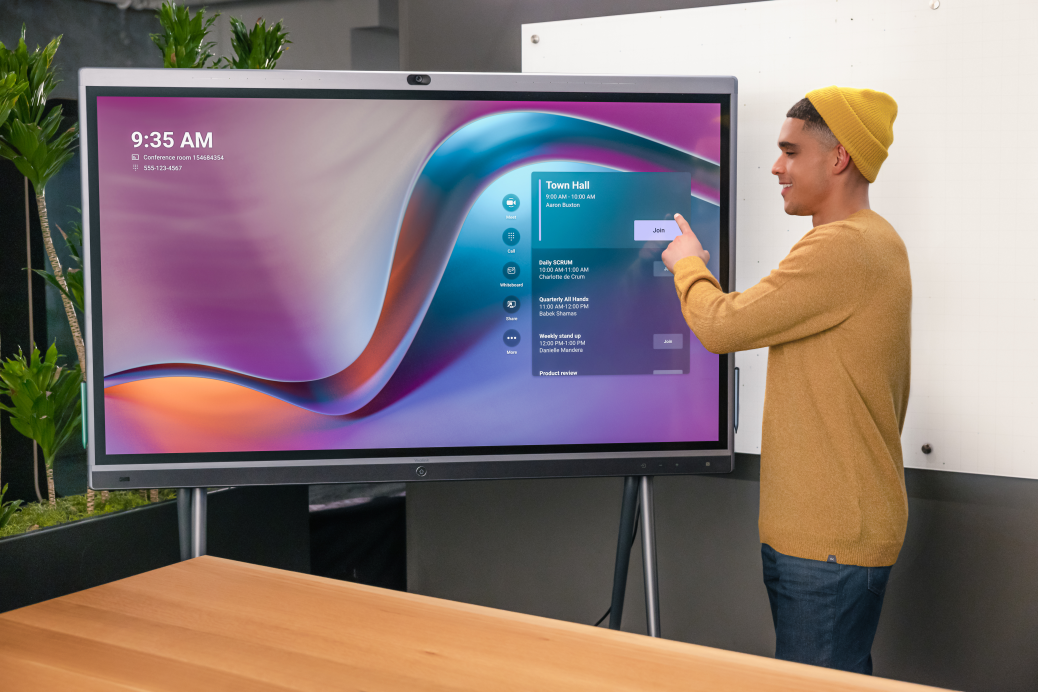
解析に使う画像は、クイックスタートで使われているものと同じ こちら の画像です。
# dotenvライブラリをインポートして環境変数を読み込む

from dotenv import load_dotenv
load_dotenv()

# 必要なライブラリをインポート
import os

import azure.ai.vision as sdk

# Azureのビジョンサービスの認証情報を環境変数から取得

service_options = sdk.VisionServiceOptions(os.environ["VISION_ENDPOINT"],
                                           os.environ["VISION_KEY"])

# 分析する画像のURLを指定

vision_source = sdk.VisionSource(
    url="https://learn.microsoft.com/azure/ai-services/computer-vision/media/quickstarts/presentation.png")

# 画像分析のオプション設定

analysis_options = sdk.ImageAnalysisOptions()

# 分析に使用する機能を指定(キャプションとテキスト)

analysis_options.features = (
    sdk.ImageAnalysisFeature.CAPTION |
    sdk.ImageAnalysisFeature.TEXT
)

# 分析する言語を指定(ここでは英語)

analysis_options.language = "en"

# ジェンダーニュートラルなキャプションを使用するかどうかを指定

analysis_options.gender_neutral_caption = True

# イメージアナライザーオブジェクトの作成

image_analyzer = sdk.ImageAnalyzer(service_options, vision_source, analysis_options)

# 画像の分析を実行

result = image_analyzer.analyze()

# 分析が成功したかどうかをチェック

if result.reason == sdk.ImageAnalysisResultReason.ANALYZED:

# キャプションがあれば表示

    if result.caption is not None:
        print(" Caption:")
        print("   '{}', Confidence {:.4f}".format(result.caption.content, result.caption.confidence))

# テキストがあれば表示

    if result.text is not None:
        print(" Text:")
        for line in result.text.lines:
# バウンディングポリゴンの座標を文字列に変換して表示

            points_string = "{" + ", ".join([str(int(point)) for point in line.bounding_polygon]) + "}"
            print("   Line: '{}', Bounding polygon {}".format(line.content, points_string))
            for word in line.words:
                points_string = "{" + ", ".join([str(int(point)) for point in word.bounding_polygon]) + "}"
                print("     Word: '{}', Bounding polygon {}, Confidence {:.4f}"
                      .format(word.content, points_string, word.confidence))

else:
# 分析が失敗した場合はエラー詳細を表示

    error_details = sdk.ImageAnalysisErrorDetails.from_result(result)
    print(" Analysis failed.")
    print("   Error reason: {}".format(error_details.reason))
    print("   Error code: {}".format(error_details.error_code))
    print("   Error message: {}".format(error_details.message))
実行結果は以下の通りです。
Caption:
   'a person pointing at a screen', Confidence 0.7768
 Text:
   Line: '9:35 AM', Bounding polygon {130, 129, 215, 130, 215, 149, 130, 148}
     Word: '9:35', Bounding polygon {131, 130, 171, 130, 171, 149, 130, 149}, Confidence 0.9930
     Word: 'AM', Bounding polygon {179, 130, 204, 130, 203, 149, 178, 149}, Confidence 0.9980
   Line: 'E Conference room 154584354', Bounding polygon {130, 153, 224, 154, 224, 161, 130, 161}
     Word: 'E', Bounding polygon {131, 154, 135, 154, 135, 161, 131, 161}, Confidence 0.1040
     Word: 'Conference', Bounding polygon {142, 154, 174, 154, 173, 161, 141, 161}, Confidence 0.9020
     Word: 'room', Bounding polygon {175, 154, 189, 155, 188, 161, 175, 161}, Confidence 0.7960
     Word: '154584354', Bounding polygon {192, 155, 224, 154, 223, 162, 191, 161}, Confidence 0.8640
   Line: '#: 555-173-4547', Bounding polygon {130, 163, 182, 164, 181, 171, 130, 170}
     Word: '#:', Bounding polygon {131, 163, 139, 164, 139, 171, 131, 171}, Confidence 0.0360
     Word: '555-173-4547', Bounding polygon {142, 164, 182, 165, 181, 171, 142, 171}, Confidence 0.5970
   Line: 'Town Hall', Bounding polygon {546, 180, 590, 180, 590, 190, 546, 190}
     Word: 'Town', Bounding polygon {547, 181, 568, 181, 568, 190, 546, 191}, Confidence 0.9810
     Word: 'Hall', Bounding polygon {570, 181, 590, 181, 590, 191, 570, 190}, Confidence 0.9910
   Line: '9:00 AM - 10:00 AM', Bounding polygon {546, 191, 596, 192, 596, 200, 546, 199}
     Word: '9:00', Bounding polygon {546, 192, 555, 192, 555, 200, 546, 200}, Confidence 0.0900
     Word: 'AM', Bounding polygon {557, 192, 565, 192, 565, 200, 557, 200}, Confidence 0.9910
     Word: '-', Bounding polygon {567, 192, 569, 192, 569, 200, 567, 200}, Confidence 0.6910
     Word: '10:00', Bounding polygon {570, 192, 585, 193, 584, 200, 570, 200}, Confidence 0.8850
     Word: 'AM', Bounding polygon {586, 193, 593, 194, 593, 200, 586, 200}, Confidence 0.9910
   Line: 'Aaron Buaion', Bounding polygon {543, 201, 581, 201, 581, 208, 543, 208}
     Word: 'Aaron', Bounding polygon {545, 202, 560, 202, 559, 208, 544, 208}, Confidence 0.6020
     Word: 'Buaion', Bounding polygon {561, 202, 580, 202, 579, 208, 560, 208}, Confidence 0.2910
   Line: 'Daily SCRUM', Bounding polygon {537, 259, 575, 260, 575, 266, 537, 265}
     Word: 'Daily', Bounding polygon {538, 259, 551, 260, 550, 266, 538, 265}, Confidence 0.1750
     Word: 'SCRUM', Bounding polygon {552, 260, 570, 260, 570, 266, 551, 266}, Confidence 0.1140
   Line: '10:00 AM 11:00 AM', Bounding polygon {536, 266, 590, 266, 590, 272, 536, 272}
     Word: '10:00', Bounding polygon {539, 267, 553, 267, 552, 273, 538, 272}, Confidence 0.8570
     Word: 'AM', Bounding polygon {554, 267, 561, 267, 560, 273, 553, 273}, Confidence 0.9980
     Word: '11:00', Bounding polygon {564, 267, 578, 267, 577, 273, 563, 273}, Confidence 0.4790
     Word: 'AM', Bounding polygon {579, 267, 586, 267, 585, 273, 578, 273}, Confidence 0.9940
   Line: 'Churlette de Crum', Bounding polygon {538, 273, 584, 273, 585, 279, 538, 279}
     Word: 'Churlette', Bounding polygon {539, 274, 562, 274, 561, 279, 538, 279}, Confidence 0.4640
     Word: 'de', Bounding polygon {563, 274, 569, 274, 568, 279, 562, 279}, Confidence 0.8100
     Word: 'Crum', Bounding polygon {570, 274, 582, 273, 581, 279, 569, 279}, Confidence 0.8850
   Line: 'Quarterly NI Hands', Bounding polygon {538, 295, 588, 295, 588, 301, 538, 302}
     Word: 'Quarterly', Bounding polygon {540, 296, 562, 296, 562, 302, 539, 302}, Confidence 0.5230
     Word: 'NI', Bounding polygon {563, 296, 570, 296, 570, 302, 563, 302}, Confidence 0.3030
     Word: 'Hands', Bounding polygon {572, 296, 588, 296, 588, 302, 571, 302}, Confidence 0.6130
   Line: '11.00 AM-12:00 PM', Bounding polygon {536, 304, 588, 303, 588, 309, 536, 310}
     Word: '11.00', Bounding polygon {538, 304, 552, 304, 552, 310, 538, 310}, Confidence 0.6180
     Word: 'AM-12:00', Bounding polygon {554, 304, 578, 304, 577, 310, 553, 310}, Confidence 0.2700
     Word: 'PM', Bounding polygon {579, 304, 586, 304, 586, 309, 578, 310}, Confidence 0.6620
   Line: 'Bebek Shaman', Bounding polygon {538, 310, 577, 310, 577, 316, 538, 316}
     Word: 'Bebek', Bounding polygon {539, 310, 554, 310, 554, 317, 539, 316}, Confidence 0.6110
     Word: 'Shaman', Bounding polygon {555, 310, 576, 311, 576, 317, 555, 317}, Confidence 0.6050
   Line: 'Weekly stand up', Bounding polygon {537, 332, 582, 333, 582, 339, 537, 338}
     Word: 'Weekly', Bounding polygon {538, 332, 557, 333, 556, 339, 538, 338}, Confidence 0.6060
     Word: 'stand', Bounding polygon {558, 333, 572, 334, 571, 340, 557, 339}, Confidence 0.4890
     Word: 'up', Bounding polygon {574, 334, 580, 334, 580, 340, 573, 340}, Confidence 0.8150
   Line: '12:00 PM-1:00 PM', Bounding polygon {537, 340, 583, 340, 583, 347, 536, 346}
     Word: '12:00', Bounding polygon {539, 341, 553, 341, 552, 347, 538, 347}, Confidence 0.8260
     Word: 'PM-1:00', Bounding polygon {554, 341, 575, 341, 574, 347, 553, 347}, Confidence 0.2090
     Word: 'PM', Bounding polygon {576, 341, 583, 341, 582, 347, 575, 347}, Confidence 0.0390
   Line: 'Delle Marckre', Bounding polygon {538, 347, 582, 347, 582, 352, 538, 353}
     Word: 'Delle', Bounding polygon {540, 348, 559, 347, 558, 353, 539, 353}, Confidence 0.5800
     Word: 'Marckre', Bounding polygon {560, 347, 582, 348, 582, 353, 559, 353}, Confidence 0.2750
   Line: 'Product review', Bounding polygon {538, 370, 577, 370, 577, 376, 538, 375}
     Word: 'Product', Bounding polygon {539, 370, 559, 371, 558, 376, 539, 376}, Confidence 0.6150
     Word: 'review', Bounding polygon {560, 371, 576, 371, 575, 376, 559, 376}, Confidence 0.0400
Caption部分では、画像のキャプションが生成されていることが分かります。Text部分は画像にあるテキストが行単位と単語単位で検出されていることが分かります。また、行や単語を囲む四角形の座標を示すBounding polygonや、行や単語のテキストの識別に関する確信度のスコアを示すConfidenceも含まれています。
おわりに
Image Analysis クライアント SDK を使ってリモート画像を解析してみました。想像以上に文字が正しく抽出されていたので驚きました。他の画像分析AIと比較してみたいです。
最後までお読みいただき、ありがとうございました!
以下のXでも情報を発信しています!